
Getting internet in Germany takes longer than in many countries, and the cheapest-looking offer is often not the cheapest one. This guide walks through the order that saves the most time and money. I compare home contracts like internet and electricity on CHECK24. The screenshots were taken there on 26 October 2026 for a public example address, Berlin city hall (Rathausstr. 15, 10178 Berlin). Prices depend on your address and the day you compare, so read the numbers as examples of how to read the screens.
1. Decide whether this is a new contract or a switch
If you are moving into a new flat, first ask your landlord whether internet is included in the rent. If you already have a contract, ask your provider whether it can move with you.
If you are staying in the same flat and only changing provider, look up when your current contract ends. You do not have to cancel it yourself: when you order, the new provider can cancel the old contract and coordinate the switch for you. Make sure your name and address are written the same way on both contracts, or the switch can be delayed.
Comparison sites start with this choice: neuer Vertrag (new contract), Vertrag wechseln (switch) or Umzug (moving).
2. Check which lines reach your address
In Germany, the lines available differ from building to building, so every comparison starts with your exact address: postcode, street and house number. You can enter it in the CHECK24 internet comparison to see what reaches your flat.
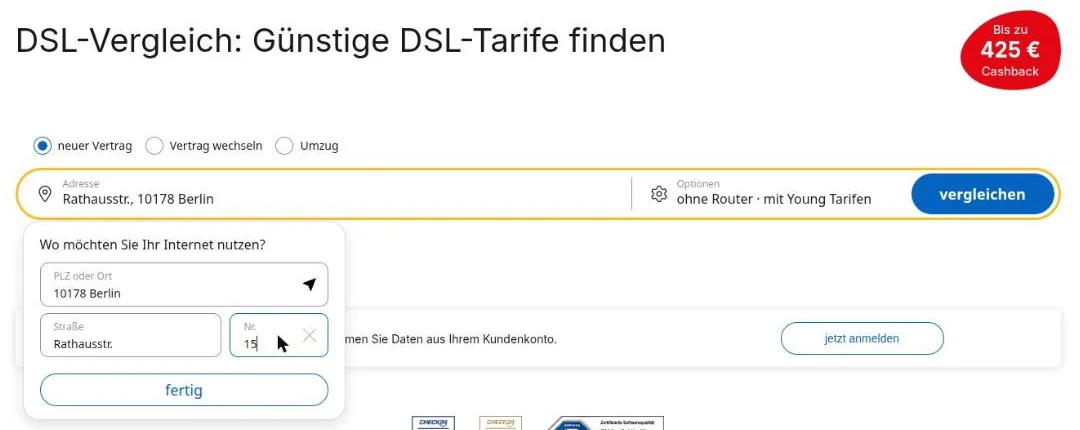
The results then show only the connection types (Anschlussart) that work at that address. For the example address these were DSL, fibre and mobile (LTE/5G); cable was not available.
- DSL uses the telephone line (a TAE socket on the wall). Upload is usually much slower than download.
- Cable (Kabel) uses the TV cable socket and is often faster for the same price.
- Fibre (Glasfaser) needs different equipment depending on whether the fibre reaches your flat or only the building.
- Mobile internet uses the mobile network. It can bridge the weeks until a fixed line is activated.
A socket on the wall does not guarantee that a product is available. The order confirmation and the activation letter are what count.
3. Choose a speed, including upload
Look at upload as well as download: video calls, cloud photo backups and gaming use more upload than people expect. For a typical household, around 150 Mbit/s download and 15 Mbit/s upload is enough. I would avoid offers with less than 5 Mbit/s upload even when they are cheap. Our family of five uses 250 Mbit/s down and 50 Mbit/s up without problems.
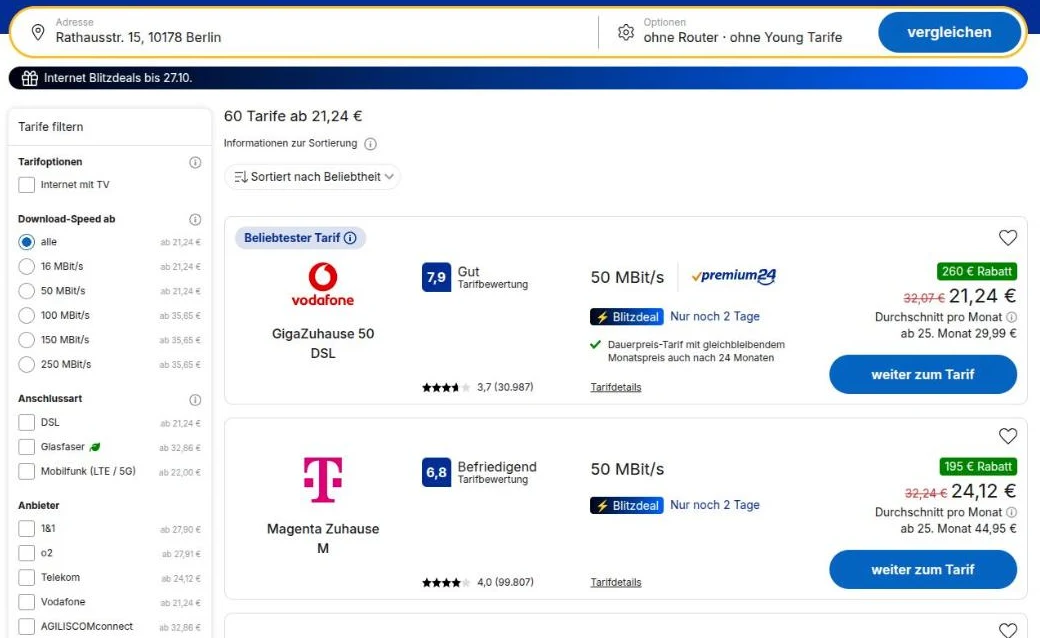
At the example address, 50 Mbit/s started at €21.24 a month on average, 100 Mbit/s and more at €35.65, and fibre at €32.86. The Max. Laufzeit filter shows 12-month and 1-month contracts separately; providers must offer a contract with a first term of at most 12 months alongside the usual 24.
4. Compare the total cost, not the monthly average
The large price on a comparison site is usually an average over 24 months that already subtracts one-off bonuses. It is not what leaves your account every month.
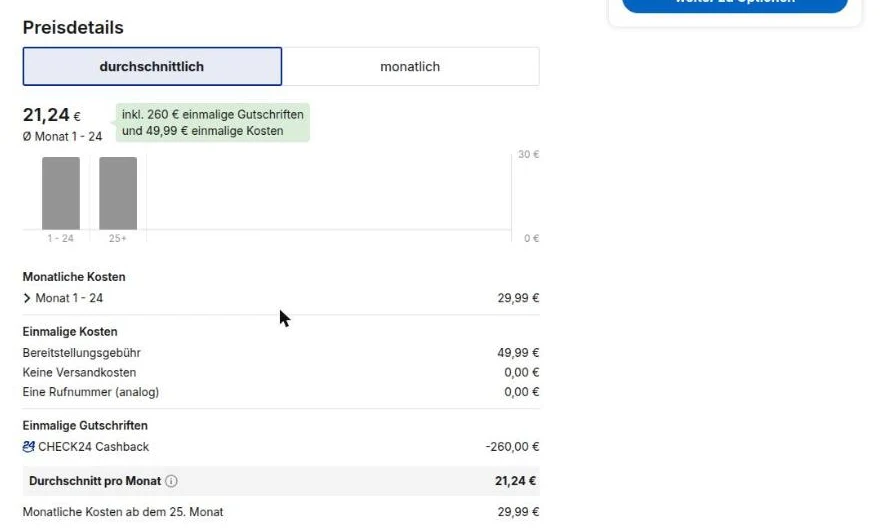
For the offer above:
- Monthly fee: €29.99 × 24 = €719.76
- Connection fee (Bereitstellungsgebühr): €49.99
- Cashback: −€260
- Total for 24 months: €509.75, or about €21.24 a month
Without the cashback, the same contract costs €769.75, about €32.07 a month. Cashback comes with conditions and deadlines, so read them before you order.
Also check the price from month 25. The Telekom offer in the results averages €24.12 but costs €44.95 a month once the first term ends. After the first term you can cancel with one month's notice, so put the end date in your calendar and compare prices again at least three months before it.
5. Decide on the router
You may connect your own router instead of renting the provider's. When you order, the provider offers rental (Miete) or purchase (Kauf).
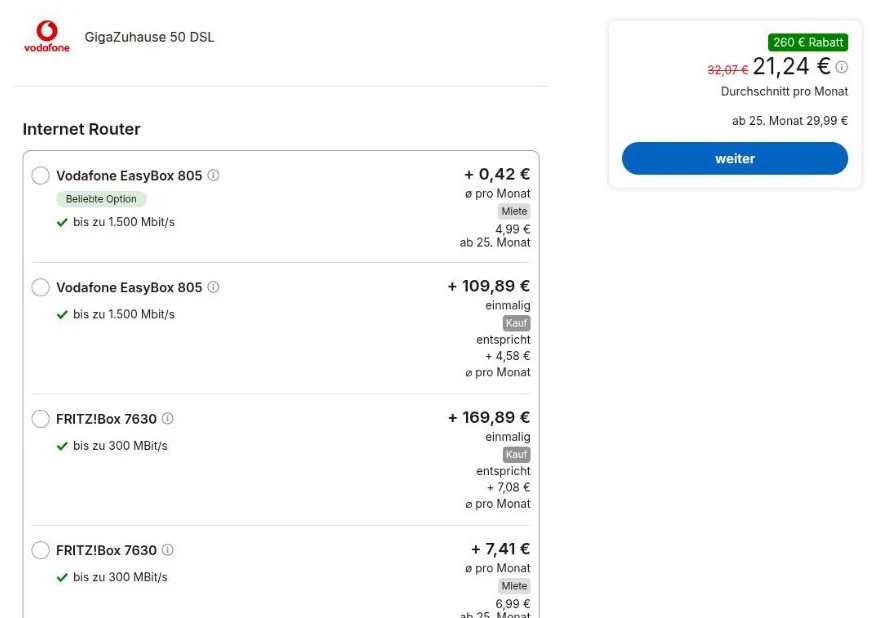
Rentals often look cheap in the first year and then cost €5–10 a month for as long as you keep the contract. Buying your own router, including a refurbished one, is often cheaper over two years. Make sure the model matches your line: DSL, cable and fibre need different devices, and fibre set-ups differ between providers.
6. Order, then confirm the activation date
At the end of the order you enter your email and payment details. If you want to keep a landline number, choose Rufnummer mitnehmen. Before you sign, the provider must give you a contract summary (Vertragszusammenfassung) with the speed, monthly price, term and notice period. Save it together with the order confirmation.
After ordering, check:
- that the provider confirmed the order
- whether the activation date is confirmed or only requested
- whether a technician needs to visit
- whether you need to register your own router
- that the end of the old contract and the start of the new one line up
A technician visit or a letter with connection instructions usually follows within about two weeks, but this varies by provider and building. If you need internet from the day you move in, plan a temporary option such as mobile data.
If the line does not work on activation day, check that activation is complete and look at the router's lights, then try a computer connected by LAN cable. If the cable connection is fast but Wi-Fi is weak in some rooms, the fix is usually your home Wi-Fi set-up, not a faster plan.
Checklist before you order
- The offer is available at your exact address.
- You checked the upload speed.
- You compared the 24-month total and the price from month 25.
- You read the cashback conditions and deadline.
- You decided whether to rent or buy a router.
- You saved the contract summary and order confirmation.
- The contract end date, and a reminder three months before it, are in your calendar.